
Issues with new nodes

neiltorda
111 Posts
July 13, 2025, 12:11 amQuote from neiltorda on July 13, 2025, 12:11 amWe had a 3 nodes petasan cluster with a combination of SSD and HDD backed with journals.
The 3 managment nodes are in three different data centers on the university campus.
This cluster was originally created using version 3 but was updated to version 4.0.0
The original crush rule used was by-host-ssd, and since the nodes were in separate locations we didn't think much about it.
I have added 3 new nodes and they appear in the node list as nodes psan10, psan11, psan12.
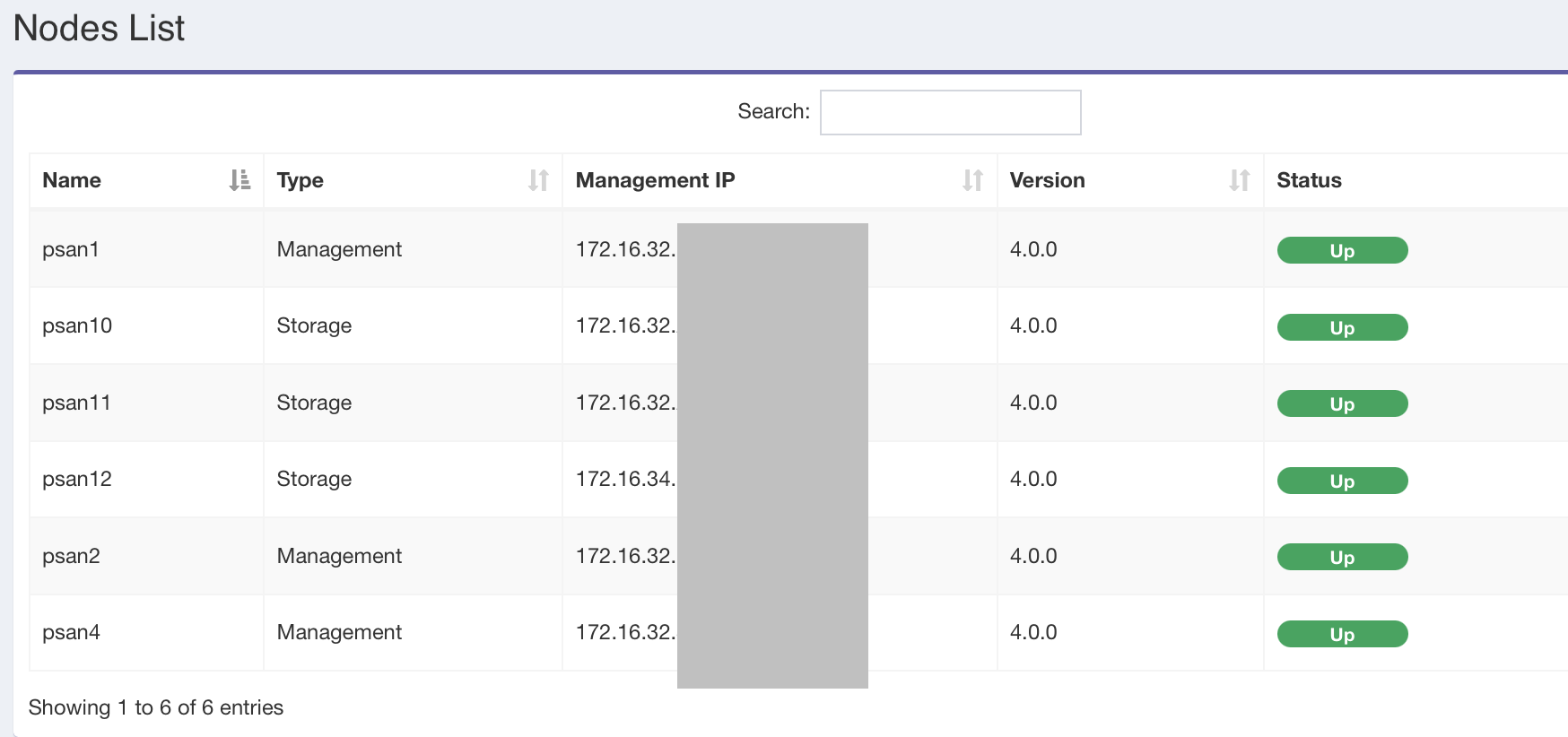
These new nodes have 20 4TB in each node.
The nodes are each in racks in the different data centers, and I would like to create a new pool and was going to use the by-rack-ssd template.
How do I get the new nodes to show up in the bucket list so I can assign them.
I have created Buckets for the Rooms and then a rack in each room as pictured:
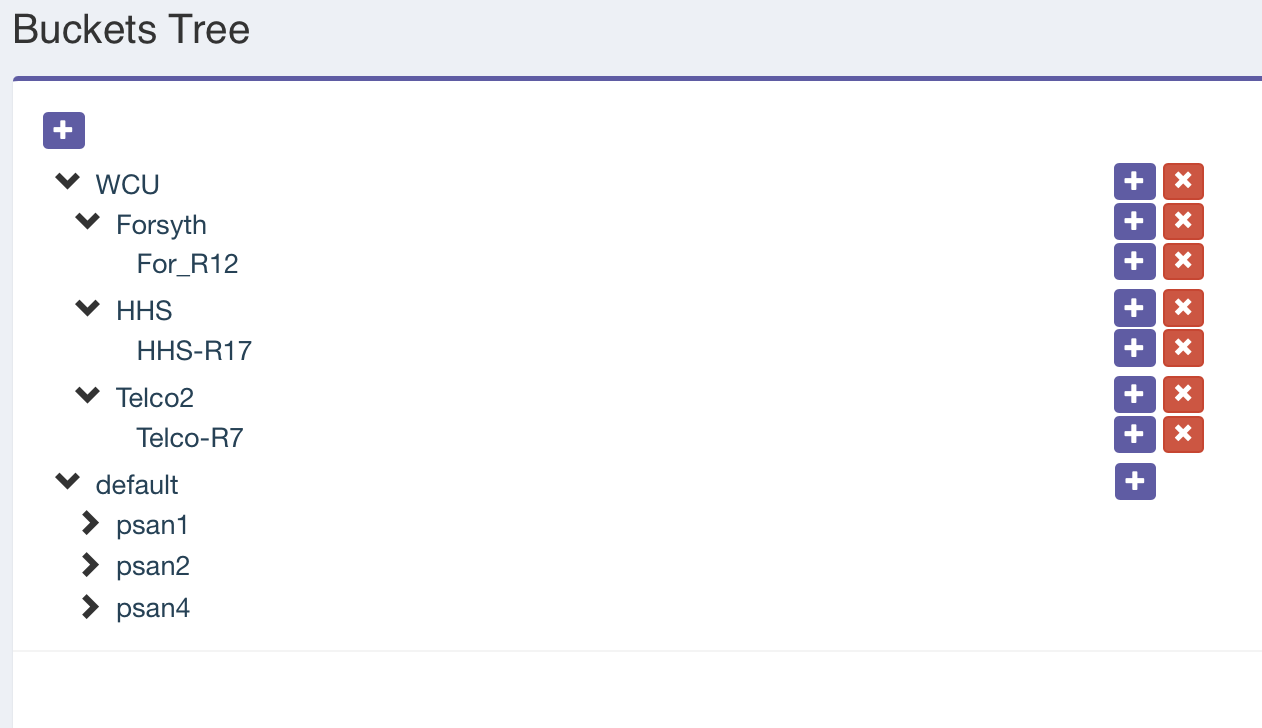
You can see in the default bucket the original 3 nodes. How do I add the new nodes to the new buckets?
I tried creating a new rule.. I added it but the number of PGs changed to 1024 instead of the 2048 I used when I created the rule:

It says this rule has no OSD's assigned, but I am unable to create any OSDs on these new nodes. When I click the + next to a disk in the disk list, it prompts me to add it:
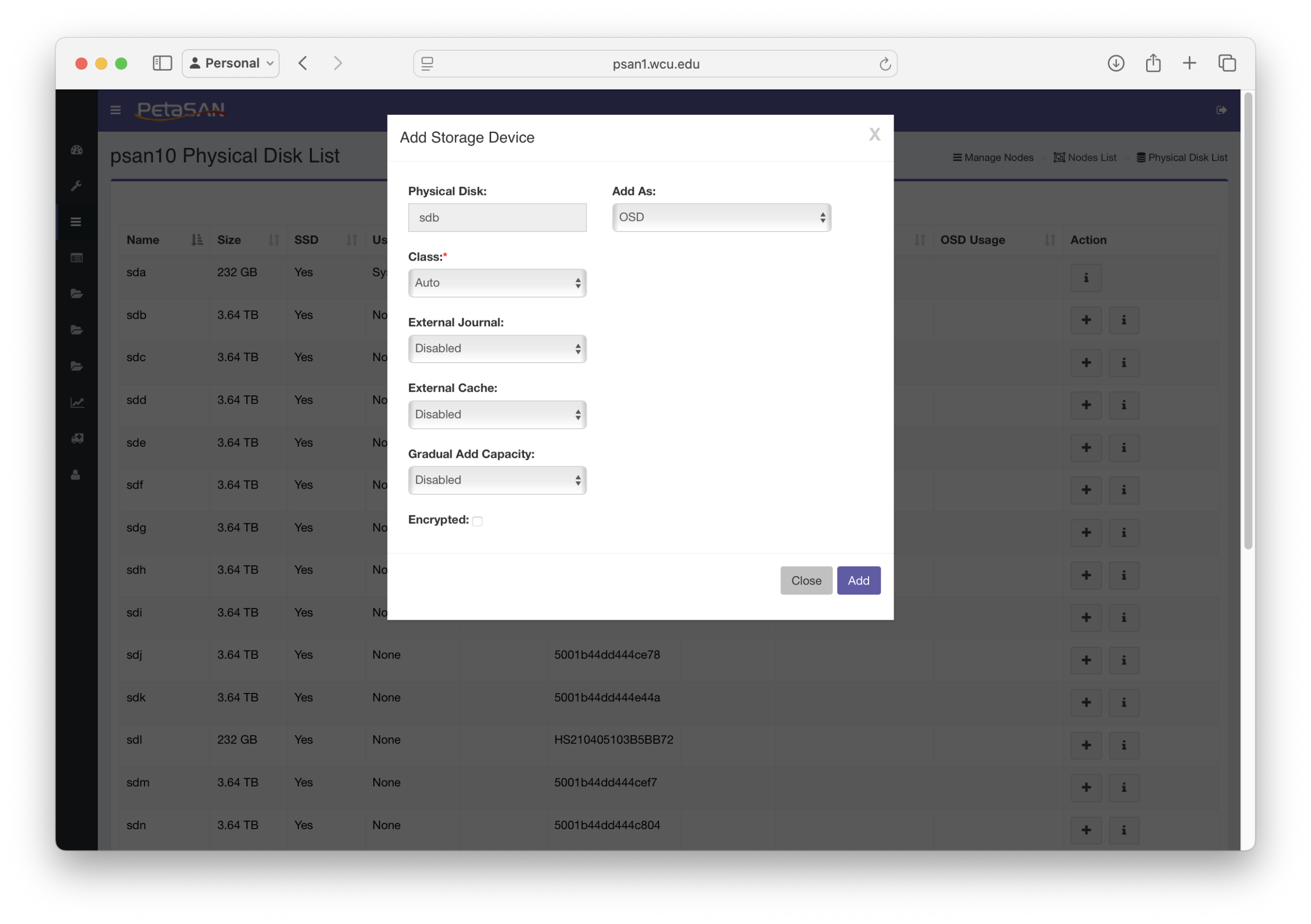
I configure as shown and click Add. That pop-over disappears, and it shows that it is adding the disk:
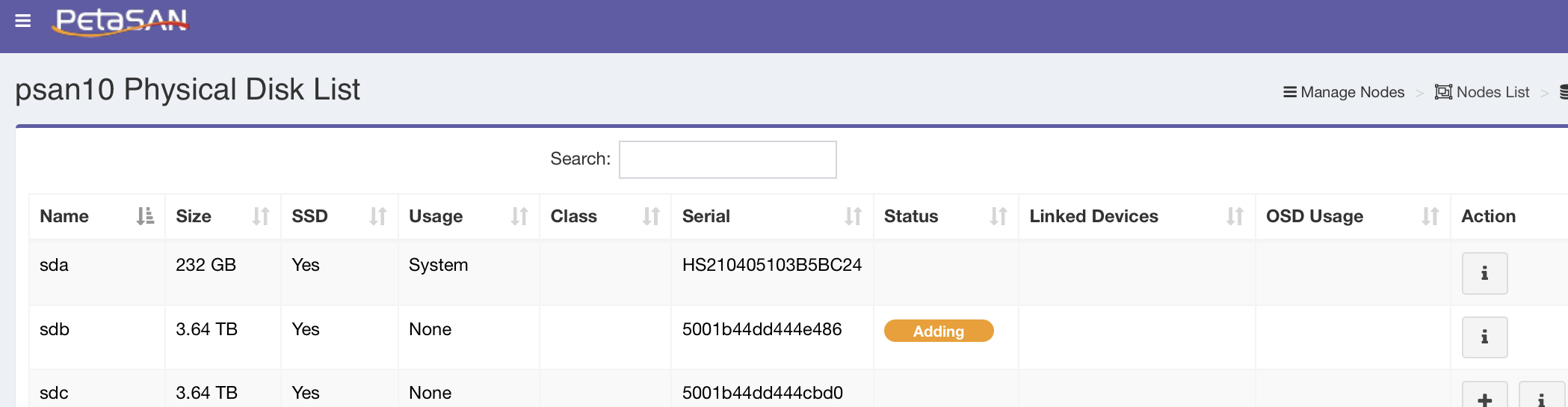
but after a minute the adding status goes away, and the disk is not added:
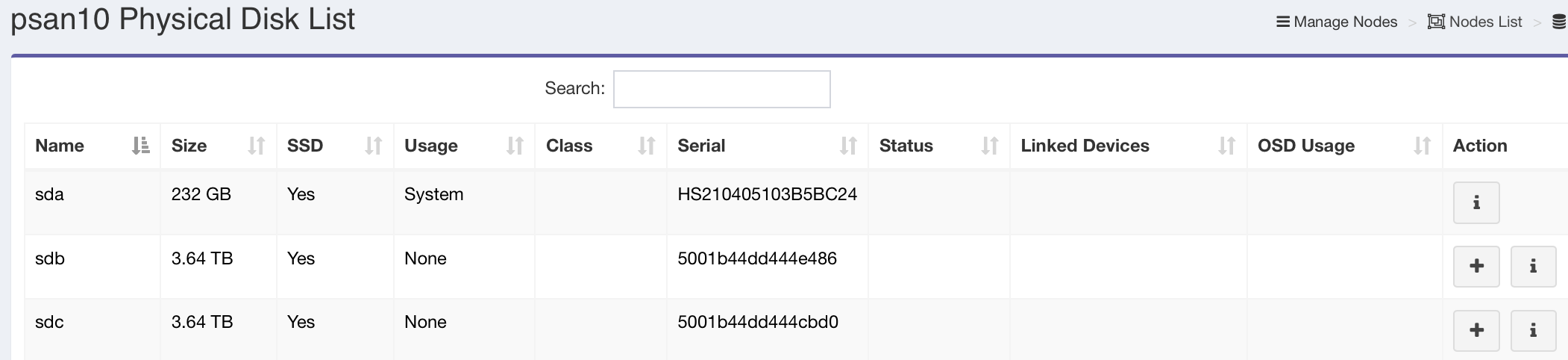
Is there something I am missing?
The main questions I have are:
- How do I make sure that the new nodes I have added are in a pool that just uses those SSDs and keeps them separated by room for the 3/2 replication
- Why do the new nodes not appear in the bucket list?
- Why can't I add OSDs using the SSDs that are in these new nodes.
Thanks,
Neil
We had a 3 nodes petasan cluster with a combination of SSD and HDD backed with journals.
The 3 managment nodes are in three different data centers on the university campus.
This cluster was originally created using version 3 but was updated to version 4.0.0
The original crush rule used was by-host-ssd, and since the nodes were in separate locations we didn't think much about it.
I have added 3 new nodes and they appear in the node list as nodes psan10, psan11, psan12.
These new nodes have 20 4TB in each node.
The nodes are each in racks in the different data centers, and I would like to create a new pool and was going to use the by-rack-ssd template.
How do I get the new nodes to show up in the bucket list so I can assign them.
I have created Buckets for the Rooms and then a rack in each room as pictured:
You can see in the default bucket the original 3 nodes. How do I add the new nodes to the new buckets?
I tried creating a new rule.. I added it but the number of PGs changed to 1024 instead of the 2048 I used when I created the rule:
It says this rule has no OSD's assigned, but I am unable to create any OSDs on these new nodes. When I click the + next to a disk in the disk list, it prompts me to add it:
I configure as shown and click Add. That pop-over disappears, and it shows that it is adding the disk:
but after a minute the adding status goes away, and the disk is not added:
Is there something I am missing?
The main questions I have are:
- How do I make sure that the new nodes I have added are in a pool that just uses those SSDs and keeps them separated by room for the 3/2 replication
- Why do the new nodes not appear in the bucket list?
- Why can't I add OSDs using the SSDs that are in these new nodes.
Thanks,
Neil
Last edited on July 13, 2025, 12:15 am by neiltorda · #1
neiltorda
111 Posts
July 14, 2025, 2:42 pmQuote from neiltorda on July 14, 2025, 2:42 pmResponding to my own post to help others if they run into a similar situation. It was a busy weekend and I am just getting around to this.
Cluster used to have another node that was removed. The reason I was unable to add an OSD was that even thought the next OSD # wasn't in the crush map, there was a lingering authentication for it, this is what was causing the error.
Once I removed that, i was able to start adding OSD's to the new nodes.
Also, once the new nodes had a OSD, they showed up in the default bucket. I was then able to move them into the correct rack and things seem to be working well.
Thanks for all you do.
Neil
Responding to my own post to help others if they run into a similar situation. It was a busy weekend and I am just getting around to this.
Cluster used to have another node that was removed. The reason I was unable to add an OSD was that even thought the next OSD # wasn't in the crush map, there was a lingering authentication for it, this is what was causing the error.
Once I removed that, i was able to start adding OSD's to the new nodes.
Also, once the new nodes had a OSD, they showed up in the default bucket. I was then able to move them into the correct rack and things seem to be working well.
Thanks for all you do.
Neil

admin
3,088 Posts
July 15, 2025, 10:54 pmQuote from admin on July 15, 2025, 10:54 pmThanks for the feedback, and glad you fixed it 🙂
Thanks for the feedback, and glad you fixed it 🙂
Issues with new nodes
neiltorda
111 Posts
Quote from neiltorda on July 13, 2025, 12:11 amWe had a 3 nodes petasan cluster with a combination of SSD and HDD backed with journals.
The 3 managment nodes are in three different data centers on the university campus.
This cluster was originally created using version 3 but was updated to version 4.0.0The original crush rule used was by-host-ssd, and since the nodes were in separate locations we didn't think much about it.
I have added 3 new nodes and they appear in the node list as nodes psan10, psan11, psan12.
These new nodes have 20 4TB in each node.The nodes are each in racks in the different data centers, and I would like to create a new pool and was going to use the by-rack-ssd template.
How do I get the new nodes to show up in the bucket list so I can assign them.
I have created Buckets for the Rooms and then a rack in each room as pictured:
You can see in the default bucket the original 3 nodes. How do I add the new nodes to the new buckets?I tried creating a new rule.. I added it but the number of PGs changed to 1024 instead of the 2048 I used when I created the rule:
It says this rule has no OSD's assigned, but I am unable to create any OSDs on these new nodes. When I click the + next to a disk in the disk list, it prompts me to add it:
I configure as shown and click Add. That pop-over disappears, and it shows that it is adding the disk:
but after a minute the adding status goes away, and the disk is not added:
Is there something I am missing?
The main questions I have are:
- How do I make sure that the new nodes I have added are in a pool that just uses those SSDs and keeps them separated by room for the 3/2 replication
- Why do the new nodes not appear in the bucket list?
- Why can't I add OSDs using the SSDs that are in these new nodes.
Thanks,
Neil
We had a 3 nodes petasan cluster with a combination of SSD and HDD backed with journals.
The 3 managment nodes are in three different data centers on the university campus.
This cluster was originally created using version 3 but was updated to version 4.0.0
The original crush rule used was by-host-ssd, and since the nodes were in separate locations we didn't think much about it.
I have added 3 new nodes and they appear in the node list as nodes psan10, psan11, psan12.
These new nodes have 20 4TB in each node.
The nodes are each in racks in the different data centers, and I would like to create a new pool and was going to use the by-rack-ssd template.
How do I get the new nodes to show up in the bucket list so I can assign them.
I have created Buckets for the Rooms and then a rack in each room as pictured:
You can see in the default bucket the original 3 nodes. How do I add the new nodes to the new buckets?
I tried creating a new rule.. I added it but the number of PGs changed to 1024 instead of the 2048 I used when I created the rule:
It says this rule has no OSD's assigned, but I am unable to create any OSDs on these new nodes. When I click the + next to a disk in the disk list, it prompts me to add it:
I configure as shown and click Add. That pop-over disappears, and it shows that it is adding the disk:
but after a minute the adding status goes away, and the disk is not added:
Is there something I am missing?
The main questions I have are:
- How do I make sure that the new nodes I have added are in a pool that just uses those SSDs and keeps them separated by room for the 3/2 replication
- Why do the new nodes not appear in the bucket list?
- Why can't I add OSDs using the SSDs that are in these new nodes.
Thanks,
Neil
neiltorda
111 Posts
Quote from neiltorda on July 14, 2025, 2:42 pmResponding to my own post to help others if they run into a similar situation. It was a busy weekend and I am just getting around to this.
Cluster used to have another node that was removed. The reason I was unable to add an OSD was that even thought the next OSD # wasn't in the crush map, there was a lingering authentication for it, this is what was causing the error.
Once I removed that, i was able to start adding OSD's to the new nodes.
Also, once the new nodes had a OSD, they showed up in the default bucket. I was then able to move them into the correct rack and things seem to be working well.Thanks for all you do.
Neil
Responding to my own post to help others if they run into a similar situation. It was a busy weekend and I am just getting around to this.
Cluster used to have another node that was removed. The reason I was unable to add an OSD was that even thought the next OSD # wasn't in the crush map, there was a lingering authentication for it, this is what was causing the error.
Once I removed that, i was able to start adding OSD's to the new nodes.
Also, once the new nodes had a OSD, they showed up in the default bucket. I was then able to move them into the correct rack and things seem to be working well.
Thanks for all you do.
Neil
admin
3,088 Posts
Quote from admin on July 15, 2025, 10:54 pmThanks for the feedback, and glad you fixed it 🙂
Thanks for the feedback, and glad you fixed it 🙂